People copy, chase, reconcile, and re-enter information because the workflow has no reliable handoff.
Scan. Log. Maintain.
Put Every Equipment Service Record One Scan Away
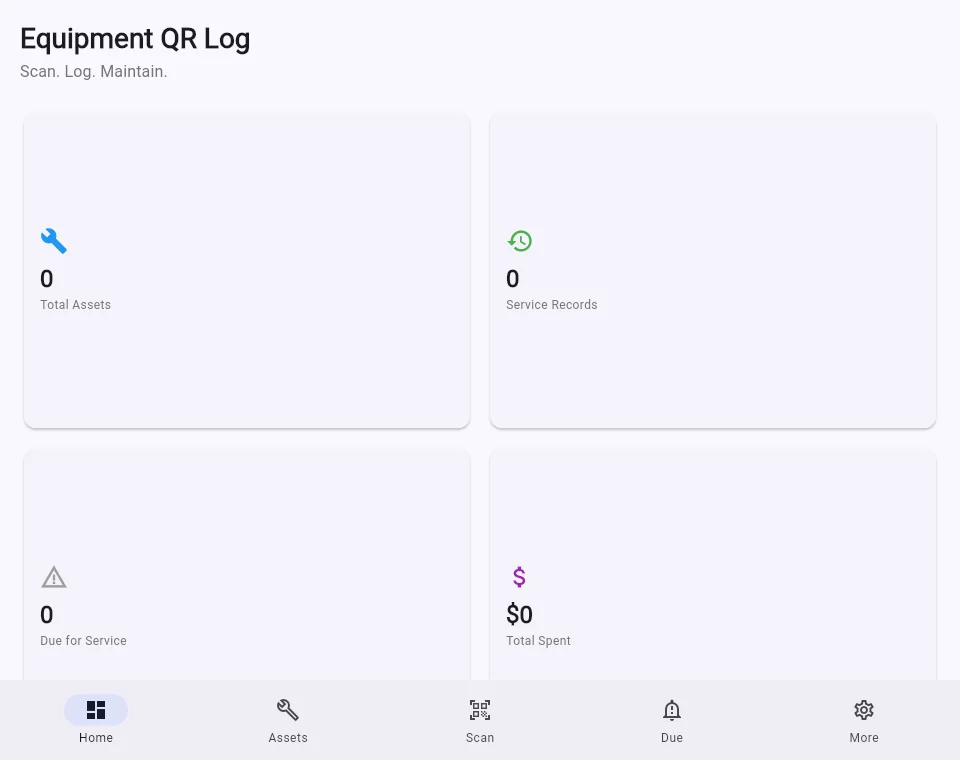
Track assets, maintenance history, upcoming service, costs, and printable QR labels without a heavy fleet system.
Linux build verified
Android release prep
No charge today. We will share final pricing, platform support, and delivery terms before you decide to buy.
The Real Cost
Equipment Tracking on Spreadsheets Is Costing You Money
Manual equipment tracking with paper logs or spreadsheets leads to lost items, inefficient utilization, and unexpected maintenance costs. Without accurate, real-time data, you're making decisions based on guesswork.
Lost and Misplaced Equipment
Without accurate tracking, equipment gets lost, stolen, or misplaced. Replacement costs add up quickly, and you may not even realize items are missing until it's too late.
Inefficient Utilization
Not knowing what equipment you have, where it is, or when it was last used means you're either buying duplicates or letting assets sit idle. Both scenarios cost you money.
Missed Maintenance
Manual tracking makes it easy to miss maintenance schedules. Late maintenance leads to equipment failures, costly repairs, and potential safety issues.
How We Help
QR-Based Equipment Tracking
Our Equipment QR Log system provides real-time visibility into all your equipment. Each item gets a unique QR code for instant identification, and every scan updates its location, status, and usage history.
Instant Identification
Scan any equipment's QR code to instantly see its name, specifications, purchase date, maintenance history, and assigned location. No more digging through paperwork.
Real-Time Location Tracking
Track the current location and movement history of every piece of equipment. Know exactly where each asset is at any given time.
Automated Maintenance Reminders
Get automatic alerts when equipment is due for maintenance based on usage hours, calendar intervals, or mileage. Never miss a service interval again.
Utilization Reporting
See which equipment is being used most, which is sitting idle, and optimize your asset allocation. Make data-driven decisions about what to keep, replace, or retire.
Why this matters
The cost is rarely one dramatic failure. It is the friction your team absorbs every day.
Disconnected tools, manual handoffs, and unclear ownership make ordinary work slower and harder to measure. The first job is to expose the constraint before choosing technology.
Important details arrive in calls, inboxes, documents, and forms but do not reach the next person cleanly.
A new subscription does not help when nobody owns the rules, exceptions, approvals, and maintenance.
How the solution works
Start with one constraint, then build only what the process can support.
Client-owned assetsHuman approval gatesInspectable handoffNo outcome guarantees
Document the trigger, inputs, systems, decisions, exceptions, and current owner.
Implement the smallest useful change with explicit approval and fallback paths.
Measure the workflow against its starting point and hand over an inspectable system.
Fast lookupScan a label to open the asset
Local recordsKeep core maintenance data on device
Portable historyExport CSV and PDF records
Focused workflow
Everything you need to move the work forward
A practical tool for a specific operational job, with less setup and less clutter.
QR asset labels
Create printable QR codes that connect equipment to its maintenance history.
Service history
Record the work performed, notes, dates, costs, and the people involved.
Due maintenance view
See which assets need service so preventive work does not disappear into a calendar.
Camera scanning
Open the correct equipment record from the job site instead of searching by serial number.
Reports and exports
Create PDF records and CSV exports for supervisors, customers, or your own archive.
Small-team design
Get the useful parts of asset tracking without enterprise fleet software overhead.
How it works
From task to trusted record in three steps
Label the asset
Create an equipment record and attach its QR label.
Scan and record
Open the asset on site and add maintenance details.
Review and export
Track upcoming service, costs, and shareable history.
Release status
Clear about what is ready
We are preparing checkout, signing, licensing, and downloads. The page will switch to purchase actions only after the customer artifacts are verified.
Desktop app
Linux build verifiedThe Linux desktop build has passed local release and runtime checks. Customer-facing signing and download delivery still need to be set up.
Android app
Android release prepThe Android project is included, but an installable release has not been certified on this machine because the required Android SDK components and licenses are not installed.
Launch note
Coming soonAndroid availability will be announced only after a signed package is built and tested on a real device.
Product questions
What teams ask before they reserve
How does a QR code maintenance log work?
Each asset receives a printable QR label. Scanning it opens the matching equipment record so a technician can review history and add service details without searching by serial number.
Is Equipment QR Log designed for small teams?
Yes. It focuses on asset records, service history, upcoming maintenance, costs, and exports without the overhead of a large fleet-management platform.
Founding access
Help shape Equipment QR Log before public release.
Reserve your place at no charge. Founding-access members get the release brief first, a direct channel for workflow feedback, and the choice to purchase only after the final terms are clear.
FAQ & risk reversal
Questions to answer before you commit
Clear ownership, boundaries, and measurement matter more than a vague promise.
Where should we start?
Start with one repeated, costly, delayed, or fragile workflow. Document how it works today and choose an observable result before discussing tools.
Do we need to replace our current systems?
Usually not. The first option is to improve the handoffs around the systems your team already uses. Replacement is considered only when the current tool is the constraint.
What stays under human control?
People keep responsibility for unusual, sensitive, expensive, regulated, or relationship-heavy decisions. Approval and stop paths are defined before launch.
How is scope and pricing determined?
Scope depends on systems, data, exceptions, access, risk, and handoff requirements. You receive a defined scope and ownership plan before paid implementation begins.
Make the next decision
What is the first business constraint worth solving?
Describe one costly, repetitive, or fragile workflow. We’ll review the fit and respond with the most useful next step—not a canned pitch.
- Where does work wait, repeat, or fall between people and systems?
- Who owns the process today, including exceptions and approvals?
- What observable result would make a first improvement worthwhile?