AI Process Automation for Business Teams
A professional guide to AI workflows, agentic systems, business use cases, rollout choices, tools, and the mistakes that derail adoption.
Quick answer: A professional guide to AI workflows, agentic systems, business use cases, rollout choices, tools, and the mistakes that derail adoption.
AI workflow automation uses AI systems, software links, and simple rules to move work with less manual effort. For small and growing businesses, the value is practical: fewer repeat tasks, faster follow-up, cleaner handoffs, and better use of the team you already have. This guide shows how agentic AI, autonomous AI agents, and automation with AI fit together, and how Custom AI Works helps teams build reliable systems.
What is AI workflow automation?
AI workflow automation is the use of artificial intelligence to complete, route, summarize, check, or trigger tasks in a business process. Instead of asking a person to copy data between systems, read every message by hand, or choose the next step in a routine flow, AI can read the input and take a set action.
Traditional automation follows fixed if-this-then-that rules. AI can handle more variety because it can understand language, sort requests, pull out details, draft replies, and use context. That makes it useful in repeat work where the inputs are not the same every time.
For example, a basic automation might send a confirmation email after a form is sent. AI task automation can go further. It can read the form, find the customer's intent, check for missing info, create a task in a CRM, draft a reply, and alert the right person only when human review is needed.
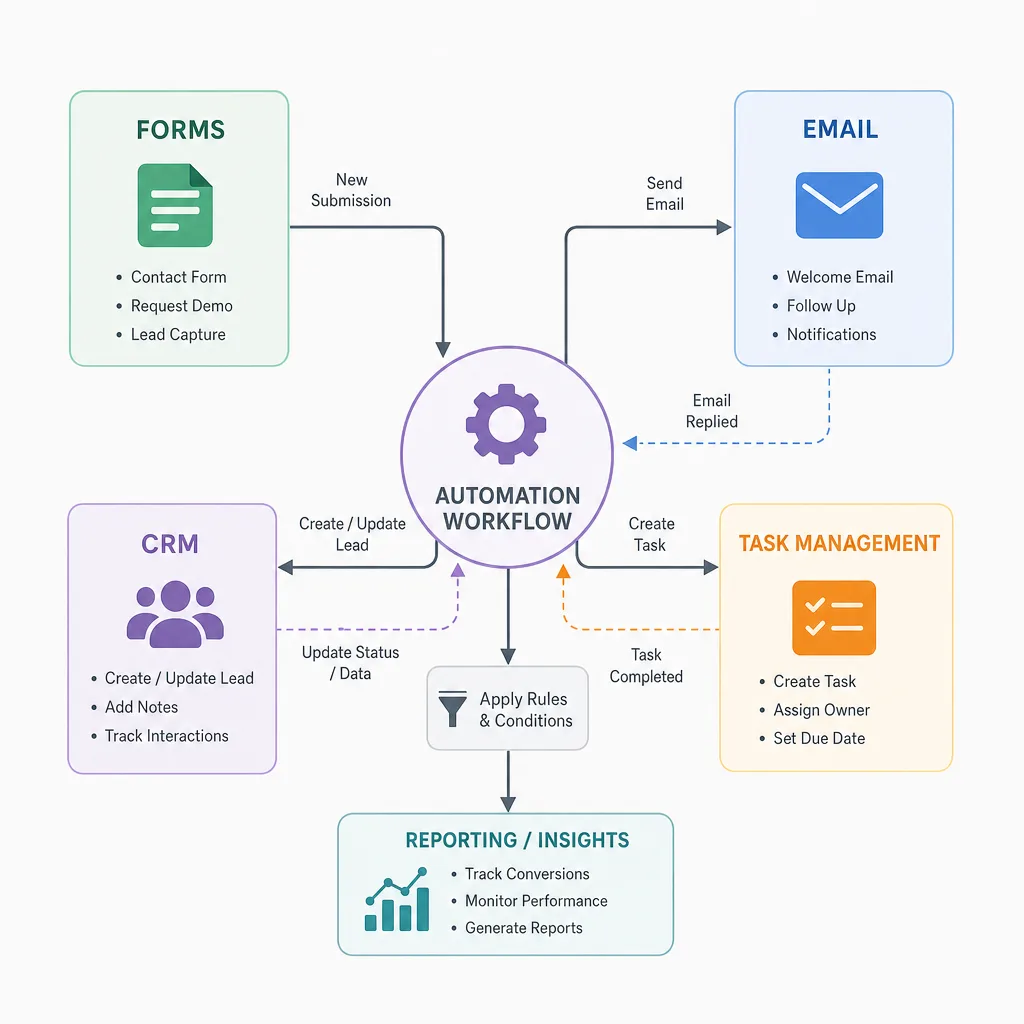
The shift from simple automation to agentic AI
Agentic AI refers to AI systems that can pursue a goal through a set of steps, often with tools, data, and rules along the way. In a business setting, an AI agent might gather information, compare options, update records, draft a response, and decide whether to hand the task to a person.
The key point is that agentic AI is not just a chatbot. Closer to a digital operator inside a controlled workflow. It can have a role, clear boundaries, approved tools, and simple rules for when to act and when to stop.
That does not mean every business needs fully autonomous AI agents at once. In many cases, the best start is a semi-autonomous flow where AI prepares, organizes, and recommends, while a human approves the final action. This gives companies the gains of smart process automation without losing control over quality, customer experience, or compliance.
Agentic AI in plain business terms
Think of agentic AI as a capable assistant that can follow a process, not just answer a prompt. It can handle a defined business result, such as qualifying a lead, drafting a proposal, triaging support tickets, or checking a project intake form.
A good agent should have:
- A clear objective: the result it must produce.
- Approved data sources: where it can look for information.
- Tool access: which systems it can use, such as email, CRM, docs, spreadsheets, or project tools.
- Decision boundaries: what it may do on its own and what needs approval.
- Audit trail: a way for people to review what happened and why.
This is where agentic AI process automation is useful. The agent is not free to roam across the business. It is built into a process with structure, safe limits, and real value.
How AI process automation works inside a business
AI process automation usually starts by mapping the work people already do. The goal is to find repeat steps, delays, manual data work, uneven decisions, and gaps in communication. Once the process is clear, AI automation tools can be used where they truly cut effort or improve consistency.
A practical AI workflow may have several layers. First, it takes an input, such as an email, web form, invoice, support note, or internal request. Next, AI reads the input and pulls out key details or sorts the request. Then the system starts the right flow, such as creating a task, updating a record, sending a draft, assigning a teammate, or asking for missing information.
The best intelligent automation solutions mix AI with standard automation, human review, and business rules. AI handles reading and drafting. Automation handles routing and system updates. People handle judgment, relationships, exceptions, and strategy.
Common workflow components
Most AI business process automation systems include some mix of these parts:
- Input capture from forms, email, chat, uploaded files, calendars, or business software.
- AI interpretation to summarize, sort, extract, translate, score, or compare information.
- Business rules to decide what should happen next.
- System actions such as creating records, updating fields, sending alerts, or making documents.
- Human approval points for sensitive, costly, unusual, or customer-facing actions.
- Monitoring and improvement so the workflow gets better as real use shows edge cases.
This structure keeps AI useful and safe. It also avoids one of the most common mistakes: trying to make AI do everything before the process itself is clear.
High-value use cases for AI automation in small business
AI automation for small business works best when it removes friction from day-to-day work. Small teams often lose time to follow-ups, intake, scheduling, reports, file order, and moving information between tools. These tasks matter, but they do not always need a person's full attention.
Lead management and sales follow-up
An AI workflow can review new inquiries, summarize the prospect's needs, update the CRM with key details, and draft a personal follow-up. If the lead meets set criteria, the workflow can notify sales at once. If information is missing, it can ask for more info before the team spends time chasing details.
This does not replace the sales talk. It gives the sales team a cleaner start and helps stop good leads from sitting unseen in an inbox.
Customer support triage
Support teams can use AI task automation to sort requests, detect urgency, summarize long messages, suggest replies, and route tickets to the right person. For common questions, AI may draft a reply from approved knowledge. For complex or sensitive issues, it can prepare context for a human teammate.
The gain is speed with control. Customers get faster replies, and staff can focus on issues that need empathy, judgment, or negotiation.
Operations and admin workflows
Many operations tasks are a strong fit for smart process automation. AI can read intake forms, compare them with required fields, prepare short summaries, organize files, draft status updates, and create project tasks. The result is less manual coordination and fewer missed handoffs.
For a growing business, this can feel like adding an AI digital support layer. It is not a true human employee, but it can act like a reliable helper for repeat work.
Finance and document handling
AI can help pull data from invoices, receipts, contracts, purchase requests, or reports. It can flag missing details, sort documents, and prepare summaries for review. Because financial and legal files can carry risk, these workflows should usually include human approval before final submission, payment, or signature.
Marketing and content operations
Marketing teams can use AI workflow automation to turn notes into briefs, draft first versions, summarize research, organize campaign tasks, and build review checklists. The best use is not handing the whole brand voice to AI. It is using AI to speed up prep, coordination, and editing while people still own strategy and final quality.
When should a business use autonomous AI agents?
A business should think about autonomous AI agents when a process is frequent, well-defined, measurable, and backed by clear rules. The more unclear, risky, or relationship-driven the work is, the more human review should stay in the flow.
Autonomy is not an all-or-nothing choice. A business can start with AI suggestions, move to AI drafts, then allow automatic actions only after performance is proven. This staged path is usually safer and more effective than launching a fully autonomous flow on day one.
Use this checklist before giving an AI agent more independence:
- The process has a clear start, end, and success point.
- The agent can get the info it needs without searching open sources.
- The flow has rules for exceptions, missing info, and odd requests.
- A person can review actions, outputs, and history.
- The business knows which actions need approval.
- The cost of a bad action is low or controllable.
- The flow can be tested with real examples before launch.
If several of these are not true yet, the process may still be a strong fit for AI automation, but it should start with human review.

Choosing the right AI automation tools
The best AI automation tools are not always the most complex. The right choice depends on your current systems, process maturity, data quality, risk level, and team habits. A tool that looks great in a demo can fail in real use if it does not fit how the business actually works.
When people search for the best AI agents for business process automation 2026, they often expect one winning platform. In reality, the best answer is usually a good stack: the right AI model, the right workflow platform, the right links, and the right process design. That is why setup matters as much as software choice.
What to review before choosing a platform
Use these points to compare options without getting lost in hype:
Evaluation area | What to look for | Why it matters |
Integration fit | Connects with your CRM, email, docs, forms, and project tools | Stops manual copy-paste from coming back |
Control settings | Supports approvals, permissions, logs, and limits | Keeps automation in line with business risk |
AI capability | Can summarize, sort, extract, reason, or draft for your use case | Matches the tool to the real task |
Ease of upkeep | Workflows can be updated as the business changes | Lowers long-term friction |
Data handling | Clear rules for access, storage, and permissions | Protects sensitive business and customer data |
Scale | Can expand from one workflow to many | Supports growth without rebuilding everything |
A strong setup should feel practical, not strange. The team should know what the AI is doing, where it gets information, and how to fix the workflow when needed.
The role of an AI process automation consultant
An AI process automation consultant helps turn business goals into working systems. That includes finding automation chances, mapping workflows, picking tools, shaping prompts and rules, building links, testing outputs, and training the team to use the system with confidence.
This role matters because AI automation sits between strategy, operations, software, and change management. A business may know where the pain is, but not how to turn that pain into a safe and easy-to-run workflow. A consultant helps close that gap.
Custom AI Works takes a practical, business-first approach to AI workflow automation. The goal is not to push AI into every part of the company. The goal is to find the flows where AI can save time, cut friction, and improve the experience for customers and staff.
What good consulting should include
The best AI consulting firms for business process automation should do more than suggest tools. Look for a partner that can help with:
- Workflow discovery: seeing how work really moves through the business.
- Opportunity ranking: choosing use cases with clear value and manageable risk.
- Solution design: defining agents, automations, links, approvals, and data access.
- Implementation: building the workflow and tying it to daily work.
- Testing: using real examples to find weak spots before launch.
- Training: helping the team learn how to use, watch, and improve the system.
- Iteration: refining the automation after it meets real-world complexity.
This is where a thoughtful partner can make the difference between a useful system and another abandoned software test.
A practical roadmap for implementation
Successful AI business process automation usually starts small and grows over time. A focused first project helps the business learn what works, build trust, and create a repeatable model for later flows.
Step 1: Identify the bottleneck
Start with a process that is visible, repetitive, and annoying enough that the team already feels the cost. Good candidates include lead intake, support triage, report prep, proposal drafting, document review, and internal request routing. Avoid starting with the most complex or sensitive process in the business.
Step 2: Map the current workflow
Write down each step from input to finish. Include who touches the work, what systems they use, what info they need, where delays happen, and what decisions are made. This map often shows that the process needs cleanup before AI is added.
Step 3: Decide what AI should and should not do
Define the agent's role clearly. Should it summarize, sort, draft, update, assign, approve, or escalate? Just as important, define what it should never do without human review. Clear limits make the system easier to trust.
Step 4: Build and test with real examples
A workflow that works on clean examples may break in real use. Test with messy emails, incomplete forms, odd requests, and edge cases. Review the outputs with the people who actually own the process.
Step 5: Launch with monitoring
After launch, watch how the workflow performs. Look for repeat errors, confusing handoffs, extra approvals, and chances to simplify. AI process automation is not a one-time install; it is an operating system that improves with careful feedback.
Measuring the value of AI workflow automation
The value of AI automation should be measured in business terms, not novelty. Useful measures include time saved, faster response times, fewer manual handoffs, better task completion, cleaner records, lower backlog, and more consistency.
Some gains show up fast, like fewer repeat admin steps. Others show up over time, like better follow-up habits or better visibility into operations. Before building, decide what success should look like so the project can be judged honestly.
Also important to measure team adoption. If employees do not trust the workflow or do not know how to use it, the technical build will not deliver full value. Good automation should make people feel supported, not replaced or confused.
Common mistakes to avoid
AI workflow automation is strong, but the wrong plan can add more complexity than it removes. Many failed projects are not caused by weak AI. They are caused by unclear processes, poor data, missing ownership, or unreal expectations.
Avoid these mistakes:
- Automating a broken process without fixing it first. AI can speed up confusion if the flow is not clear.
- Giving agents too much autonomy too soon. Start with review points and expand only when performance is steady.
- Skipping documentation. The business should know how the workflow works, who owns it, and how to update it.
- Ignoring employee input. The people doing the work know the edge cases a diagram may miss.
- Choosing tools before defining the use case. Software choice should follow the workflow, not lead it.
- Treating AI as a replacement for accountability. Someone still needs to own the result.
The best systems feel almost boring once they are running.
Work appears in the right place.
Drafts are ready when needed.
Records are cleaner.
People spend less time chasing details and more time making decisions.
Building an AI-ready business
An AI-ready business does not need perfect systems, a large tech team, or a full digital change plan. It needs a willingness to clarify processes, improve data habits, and start with focused use cases. That base makes every future AI project easier.
The most successful companies treat AI as part of operations, not as a side test. They define ownership, set review standards, and keep improving workflows as the business changes. Over time, one successful flow can grow into a connected set of intelligent automation solutions across sales, service, finance, marketing, and admin.
Custom AI Works helps businesses move from AI curiosity to practical use. If you are exploring agentic AI, AI task automation, or a custom AI workflow for your team, the next step is to find one process where automation can create quick clarity and clear relief.
Ready to turn repetitive work into a smarter system?
AI workflow automation is most useful when it is built around your real business, your tools, and your team's daily work. Custom AI Works can help you review opportunities, design the right automation plan, and build AI agents that support your operations without extra complexity.
If your team spends too much time on manual follow-up, intake, routing, reporting, or repeat admin work, now is the time to explore what AI process automation can do. Contact Custom AI Works to discuss a practical AI automation roadmap and see where an AI digital workflow can make the biggest difference first.
Publication references and safeguards
These primary references give readers a direct path to verify the risk, governance, and example context used around implementation decisions.
Sources and methodology
External claims in this guide are linked to the original or authoritative source available at publication time. Sources are provided for context, not as a promise that another business will achieve the same result.
Frequently asked questions
What is the difference between AI workflow automation and traditional automation?
Traditional automation usually follows fixed rules, such as if this, then that. AI workflow automation can handle more variety because it can read language, sort requests, pull out details, summarize information, and draft replies. That makes it useful for business processes where the steps repeat but the input is not always the same.
Does a business need fully autonomous AI agents to benefit from AI automation?
No. Many businesses should start with semi-autonomous flows where AI prepares, organizes, summarizes, or recommends actions while a person approves the final step. This gives the team practical gains like faster follow-up and cleaner handoffs without losing control over quality, compliance, or customer experience.
Which business processes are usually good first candidates for AI workflow automation?
Good starting points are visible, repetitive, and time-consuming flows such as lead intake, sales follow-up, support triage, report prep, proposal drafting, document review, and internal request routing. The best first project should create clear relief without being the most complex or risky process in the business.
How should a company decide whether an AI agent can act alone?
A company should only give an AI agent more independence when the process is frequent, well-defined, measurable, and backed by clear rules. The workflow should have known success points, reliable data access, exception handling, approval rules, logs, and tests with real examples. If the risk of a bad action is high, human review should stay in the flow.
What role does Custom AI Works play in AI process automation?
Custom AI Works helps businesses move from AI curiosity to practical use by finding useful automation chances, mapping workflows, designing AI agents and approvals, picking tools, building links, testing outputs, and training teams. The focus is on practical systems that save time, cut friction, and support staff rather than adding extra complexity.
Which repeated workflow should your team improve first?
Bring us one bottleneck, the systems involved, and the current handoff. We’ll help you define a measurable first automation without forcing a platform decision.
Find Your Best First Automation →